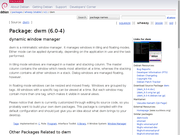
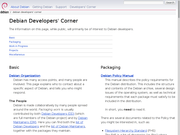
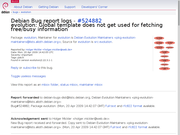
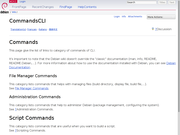
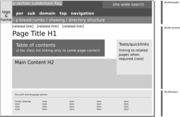
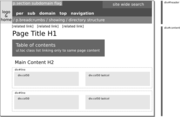
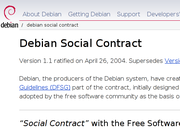
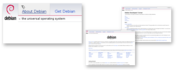
Please note that the diagram below does not represent the visual appearance of the design proposal.
Design Strategy
It must work on the scale of the whole site and the individual page
To achive a legible website for a large site such as debian.org the whole
breadth of content/typography and graphic items need to be marshalled into
an overall visual hierarchy. On the large scale of the whole site as well as
the smaller scale of the individual page the various elements need to be
given their appropriate prominence.
Information hierarchy
For an easy understanding of the site the homepage should feel more special that a subpage of the
documentation, this can be done using a more specific layout, more colours
and more graphics that the other pages. The importance of a page within the
hierarchy should be made clear by the previously mentioned means, the same
of course goes for the individual page.
Headings, emphasis and rulers mark out the importance of content. For the
page to work and all content to be legible the "loudness" of the page needs
to be pitched to a level where structure is clear but even the less important
elements are legible. Using the analogy of speech one cannot hear a normal
conversation if someone is screaming in the same room. The main difficulty
then becomes deciding the importance of every element and visually marking it
out, giving it the appropriate tone of voice.
The difficulty is knowing the content and its relative importance
Every link on a page undermines the other links, makes them more difficult
to find. Every visual emphasis is a loud voice drowning the others out. To
make this workable, decisions have to be made about the relative importance
of information and then carefully orchestrate them into a whole where
no element drown the others out, and perhaps even more importantly edit and
remove content.
Logo example
What can the debian logo do for you on a page deep into the site? That
partially depends on how you arrived, via a search engine or by navigating
the site? In both cases however it should simply mark out whose site you are
visiting and offer a means of reaching the home page. It should have the
visual prominece to achieve this goal. If it's to small or located in an
less prominent place this will not be achieved. If it's way bigger that
needed it will start to impinge on other content, taking up space resulting
in important infomation being off screen or simply visually distracting from
other information.
The most notable changes are
directory bread crumbs
per sub-domain top level navigation (good idea?)
the sub domain flag
search box in top right corner
Mirror selector in footer
The sub domain flag is useful for highlighting that you have
entered a specialised area of the website, say packages or
wiki.debian.org. It also signals and makes understandable the
change in top level navigation.
Can the top level links change?
By allowing top level links to change between sub-domains they
can work harder in each context. The home button will obviously
be persistent.
Sites without persistent top level links such as OpenBSD.org and UseIt.com work surprisingly well.
Subdomain examples
Work in progress. Please note that all links are broken
Not very focused homepage with way too many distracting links and
to much information being crammed into one page. The rest of the
website hovers uncomfortably between being a document based site such
as OpenBSD.org and a
contextually linked site such as Fedoraproject.org
Good at labelling links and revealing choices at the right time.
Very easy to find your way around the website. Does not overwhelm the
user with too many choices. Appears purposeful and focused.
Extremely simple website that works as a collection of
hyperlinked documents with no dedicated navigational elements except
on the homepage. The site is small, disciplined and extremely
simple.
Notable for the contextual/partial sitemap that appear combined
with breadcrumbs at the bottom of the page. Gimp.org and Blender.org uses a similar
footer.
Additional comments
Editing
The debian website needs some serious
editing. Particularly the pages reached via the top level links should be
reorganised and simplified. In many cases long sentences can be replaced with
grouped lists of links. The current writing style and layout does not aid
scanning for useful links.
Topic/Category pages cleanup
The most problematic pages in the debian website are currently pages that
are intermediate ones you pass on your way to content.
The choices are not described in a consistent way which makes it
difficult to find what you are looking for. If they were always structured in
the same way, say title, description, link it would be easier to scan as you
have learned the pattern from the previous entry.
For comparison see w3
webdesign page which integrates similar information in a more
consirtent and simpe way.
Rename top links?
I propose the following top links
About Debian
Works as it is
Download instead of Getting Debian
I presume a very large percentage of people looking to get debian
want to download some type of file. The first paragraph and the table
of contents can mention the other options. The word
Download is such a clear and commonly used label
that it is a mistake not to use it. I understand that there might be
political reasons to push the buy cd's or pre-installed options but
from the point of view of a user of the website download would be a
much clearer and more useful label. That said there might be an
argument for keeping the old label for the top navigation and instead
introducing a more prominent download button on the homepage.
Support
Works although perhaps not perfect?
Develop instead of Developer's Corner
The current label Developer's Corner has a very diffrent tone
than the other top links. Develop would be more similar to download
and support as well as more of a call to action ;)
Older versions
Please note that only the top level navigation is
functioning.
Please note that the proposal is only a css reformatting of
the existing content with some very minor changes to the current
debian.org pages. Much of the content should in my opinion be
edited but this is beyond the scope of this visual redesign.
Homepage including all other top
level pages. Please use the top menu to view them.
Update 2010-09-05
Quite a few updates to debwiki. The KallesDesign pages on
the debian wiki will become the place to go for updates on my design.
Update 2010-06-02
To make the stylesheets and html structures I've been working on more useful they need to be
attractive and easy to use for those who create new subsites for various
projects and services.
A first step would be to document the css and the various reusable
elements it provides. A page that list the html and shows the result might
be a good idea. This would also help discover missing parts of the
stylesheet.
My current designs are all based around the same debian.css and have
extra stylesheets to implement site/service specific things and to work
around backend/template differences. This architecture could probably be
refined and enhanced to make it more general.
Update
2010-02-18
Commited some changes to the getting debian pages as well as an
experimental change of the languages to a drop down menu. The dropdown does
not work for all users at this point w3m failed so I have to do some
homework.
Update 2010-02-12 Google is using the
same idea I proposed for the Debian homepage to create a bandwidth friendly
but full witdh graphic. A repeated background banner with a centered more
detailed and expressive graphic that fits into the banner. small, large png (the mountains are
repeated)
Update 2009-12-13
Been looking into the "Getting Debian" issue, no solution yet just a
few sketches and notes. See here
Update 2009-10-29
The Ubuntu homepage has been
redesigned. The amount of links is reduced and a consistent
heading, content, link structure has been introduced. Very clear and a
lot better than before, not to dissimilar to my proposal for some
pages. The only bad idea is using images for the "netbook" and "server"
headings, totally unnecessary. Making it worse they used the orange
link colour, for non link text in those image based headings. If the
debian homepage could be made as clear but without the mistakes it would be a great achievement.
Update 2009-10-11
Latest tweaks to the homepage can be found here
Update 2009-10-09
Created a feedback page where i collect feedback answers and some solutions
Update 2009-09-29
Gerfried Fuchs have set up a test site at www.deb.at. In other news I've fought and won over the slightly dissapointing swineflu which is not what it's all hyped up to be.
Update 2009-09-09Apple.com vs Microsoft.com. Not a great review but it has some good if obvious points. After you’ve read the headline you can proceed to read the marketing blurb below, which leads nicely into a call to action signup button for the free trial. If you’re not interested in the trial, there are more features below to persuade you, each one ending with a “Learn more” link to a more detailed feature page. This leaves no dead ends and keeps the user browsing. The way the content and the design work together and lead you on is together with the readability and clarity of design one of the best features of the apple website.
Update 2009-08-26
Updated the wiki style sheets to work mostly according to the baseline grid. Keep in mind that the wiki is still a hack.
Update 2009-08-12
Tweaked all font-sizes, leadings, margins and paddings to work on the baseline grid. Also made changes to respect browser font-size settings.
Update 2009-08-08
Updated the bugs pages to reflect recent changes. Thinking that secondary navigation could be added as seen on the package pages in a right justified horisontal list under the top navbar. Quite similar to how apple does it on some pages.
Update 2009-07-10
A page dedicated to the debian packages site has been added
Update 2009-06-26
I'm currently making invisible changes to the wiki, cleaning up the structure of the
css and tweaking the python template. Currently struggling with
enabling pagetrail for non logged in users.
Update 2009-06-17
Progressing with the wiki work which is now pretty
decent. The work on the wiki has resulted in some tweaking of the
debian.org stylesheet including the removal of all pixel based font
sizes and the introduction of underlined links (not as pretty but better
accessibility). I also moved the modified Support and Getting Debian pages
to my testsite (see
above for password) This means those pages are no
longer clean css and webwml generated pages but have been hand tweaked.
Update 2009-06-11
There is now a dedicated Wiki Design Page and an
initial test design
Update 2009-06-09
I'm currently looking at the wiki. By logging in to wiki.debian.org selecting Settings >
Preferences, adding this
stylesheet as the User Css Url and debwiki as
the theme you can see how I'm getting along. The stylesheet is quite a hack
but will hopefully become better.
Update 2009-06-01
I have been looking at reorganizing the top level pages definately not there
yet but here they are support, distrib, devel. I've shortened some texts added a
list of quick links and created a two column layout. Please compare to
existing pages support, distrib, devel.
Just trying to make it all a bit clearer.
Update 2009-05-20
This section
of the gnome hig sums up the visual design problems with the
Debian website. The images show a comparison between a carelessly arranged
and a more orderly and better described Gnome dialog. It must be fairly easy
to recognize the Debian website in the first (poorly designed) examle. On another note... I have
been testing some details of the proposed layout reverting, perhaps only
temporarily, to details from an earlier design.
Update 2009-05-13:
Came across the w3 beta site. The
w3 site is in some ways very similar to the debian website in size,
complexity (ok not quite), type of content and even what it needs to do. Therefore
the redesign process and solutions are very interesting. see Recommendation
to be compared with debian docs and About the
redesign the goals and features could be nicked for
debian ;-) Their new site is not always as visually sharp and clear
as it could be (those icons?) but interesting beyond the visuals.
In addition this list of Information Architecture mistakes is quite useful.
Update 2009-03-09: The site has been updated use password below. I reverted some changes to content and top navigation. The proposal is now lighter on changes to content. Please note that the homepage is not included in the diff. The footer has added navigation as seen at gimp.org, apple.com, blender.org. The breadcrumbs are still placeholders, haven't had time to look into Perl.
Update 2009-03-08: A diff is now available. There are minor diffrences betweeen the online version and the diff.
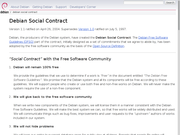
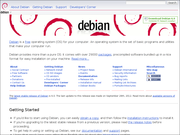
Update 2008-12-06: Revised the navbar to give better
interaction feedback and integrate the elements in a tighter and
nicer way. Also added the screenshot above, the layout diagram below
and some notes on the design. Need to learn some perl to figure out
how to make the breadcrumbs represent the parent folders.
Update 2008-11-23: You can access a webwml
generated version of the debian website here. To prevent
it being indexed by search engines I put in behind some simple
authentication, use name debs and p word
l3tm3C1t. It's not all there but was simple
enough to implement.
Update 2008-07-01: Looked at the proposal
again and decided to polish up the design. Redirected people
coming for the outdated Debian bling proposal to this page.
Update 2007-12-12: I have prepared a
tighter version for those who are concerned
by wasted space in the layout.